
Iggy Web UI
Iggy Web UI provides a comprehensive dashboard for Iggy server. It allows you to monitor the server's health, streams, topics, browse the messages, users and more. The dashboard is built with SvelteKit and TypeScript and is available as open-source as well as the Docker image on Docker Hub.
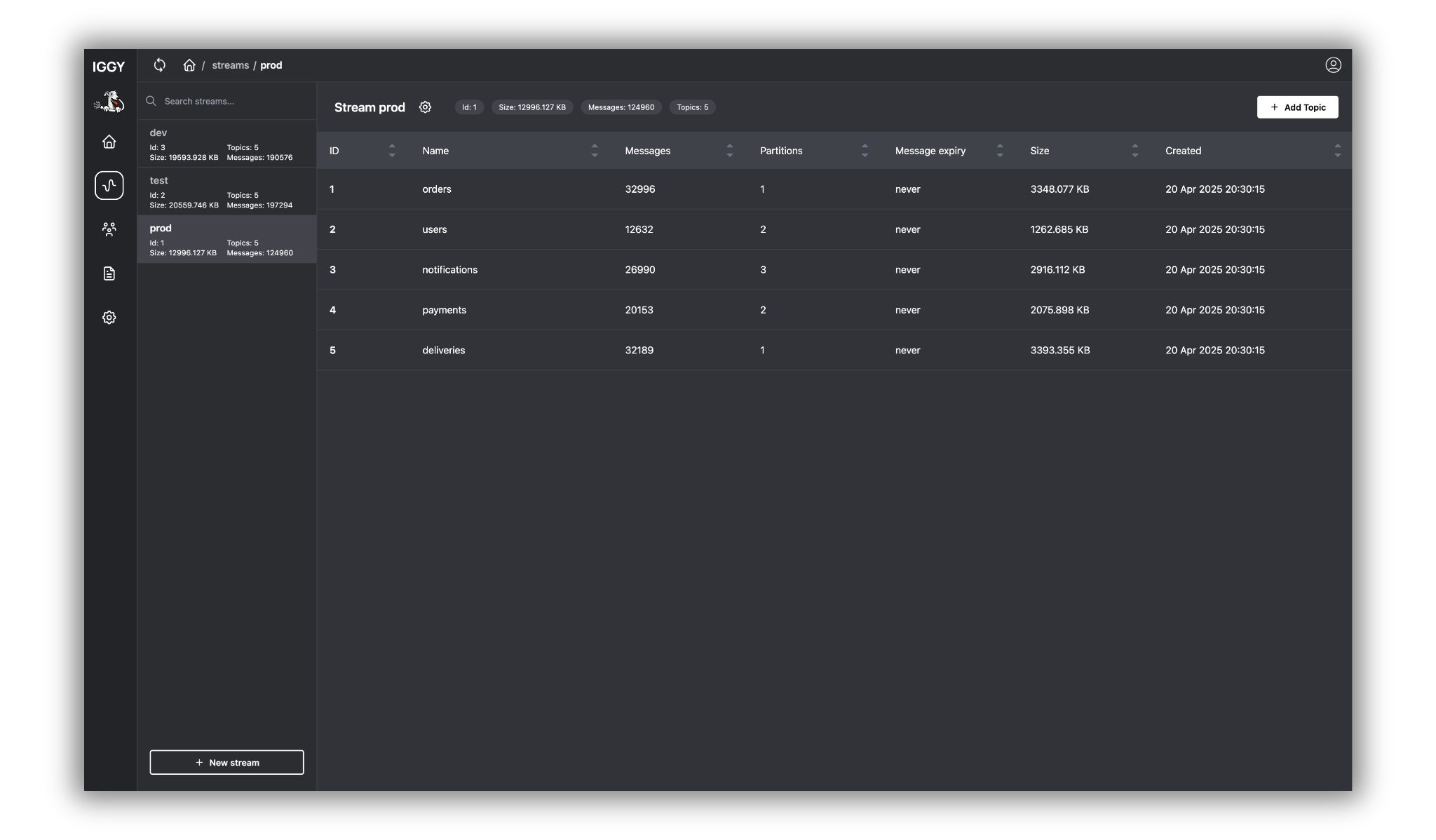
Running modes
Embedded mode
The Web UI can be compiled directly into the Iggy server binary using the iggy-web feature flag. When enabled, it is served at the /ui endpoint:
[http]
enabled = true
web_ui = true   # Enable embedded Web UI at /ui
This mode requires the server to be built with the iggy-web feature. If the server is compiled without it and web_ui = true, a warning is logged but the server continues to run normally.
Standalone mode
Run the Web UI as a separate container:
docker pull apache/iggy-web-ui
docker run -e PUBLIC_IGGY_API_URL=http://iggy-server:3000 -p 3050:3050 apache/iggy-web-ui
Features
The Web UI provides the following pages and functionality:
- Dashboard - server health overview and key metrics
- Streams - list, create, and manage streams
- Topics - manage topics per stream (create, update, delete, purge)
- Partitions - view partition details per topic
- Messages - browse messages per partition with built-in decoders:
- JSON decoder (formatted JSON output)
- String decoder (UTF-8 text)
- XML decoder
- Clients - list connected clients and their sessions
- Logs - real-time server log viewer
- Users - user management (create, update, delete, permissions)
- Settings - server configuration overview, terminal access, and Web UI preferences
Docker Compose example
Here's the full example of the docker-compose.yml file that starts the Iggy server, initializes it with the my-stream stream and my-topic topic with the help of Iggy CLI, and starts the Iggy Web UI:
iggy:
  image: apache/iggy:latest
  container_name: iggy
  restart: unless-stopped
  cap_add:
    - SYS_NICE
  security_opt:
    - seccomp:unconfined
  ulimits:
    memlock:
      soft: -1
      hard: -1
  environment:
    - IGGY_ROOT_USERNAME=iggy
    - IGGY_ROOT_PASSWORD=Secret123
    - IGGY_HTTP_ENABLED=true
    - IGGY_HTTP_ADDRESS=0.0.0.0:80
    - IGGY_TCP_ENABLED=true
    - IGGY_TCP_ADDRESS=0.0.0.0:3000
    - IGGY_QUIC_ENABLED=false
    - IGGY_WEBSOCKET_ENABLED=false
    - IGGY_HEARTBEAT_ENABLED=true
    - IGGY_HEARTBEAT_INTERVAL=5s
  ports:
    - "3010:80"
    - "5100:3000"
  networks:
    - iggy
  volumes:
    - iggy:/iggy/local_data

init-iggy:
  image: apache/iggy:latest
  container_name: init-iggy
  networks:
    - iggy
  depends_on:
    - iggy
  entrypoint: [ '/bin/sh', '-c' ]
  command: |
    "
    echo 'Logging in to Iggy'
    iggy --tcp-server-address iggy:3000 --username iggy --password Secret123 login 1m

    echo 'Creating my-stream...'
    iggy --transport tcp --tcp-server-address iggy:3000 --username iggy --password Secret123 stream create my-stream
    echo 'Created my-stream'

    echo 'Creating my-stream topics...'
    iggy --tcp-server-address iggy:3000 --username iggy --password Secret123 topic create my-stream my-topic 1 none 7d
    echo 'Created my-stream topics'
    "

iggy-web-ui:
  image: apache/iggy-web-ui:latest
  container_name: iggy-web-ui
  restart: unless-stopped
  environment:
    - PUBLIC_IGGY_API_URL=http://iggy:80
  ports:
    - "3050:3050"
  networks:
    - iggy

networks:
  iggy:

volumes:
  iggy: